AI Navigation Assistant
You can now self-serve with the new AI Navigation Assistant, built right into the RentalMatics platform. Get real-time support and answers on the spot, without raising a support ticket.
We all know the feeling. You need a report, a filter or a workflow, and you know it’s in there somewhere. So you click through menus, hunt for the right screen, or send a ticket and wait.
The AI Navigation Assistant changes that. It’s a true self-serve resource, there to guide you around the platform and point you in the right direction the moment you need it. It’s designed to help your team work more efficiently from day one.
Never dig through menus again
The Assistant is available on every page, so there’s no need to go looking for it. Wherever you are in the platform, help is one click away.
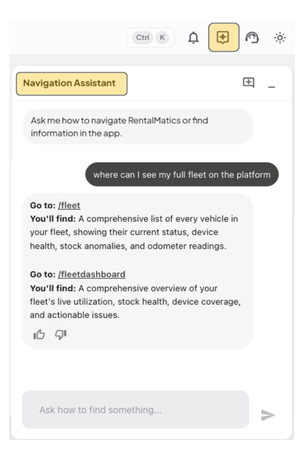
Start a conversation, in plain English.
- It opens with a simple prompt asking how it can help you navigate or find information
- Type your question naturally. There are no special commands to learn
- It points you to the right report, filter or workflow straight away
- Skip raising a support ticket for simple navigation questions
What you can ask
If you’d normally ask a colleague or the support team where to find something, ask the Assistant instead. For example:
- “Where do I find the Fleet Report?”
- “How do I set up a geofence alert?”
- “Which report shows vehicles that haven’t moved recently?”
- “How do I filter the Interactive Map by location?”
- “Where can I see toll charges for a vehicle?”
You get guidance in seconds, so you can get back to running your fleet.
Need the data itself? Meet its partner, the AI Fleet Assistant.
The Navigation Assistant shows you where to go. When you want the fleet data itself, the AI Fleet Assistant in the Fleet Report and Interactive Map dashboards finds it for you. Ask instead of filtering: type what you’re looking for, such as “Show me all vehicles currently in bodyshops”, and it returns the matching vehicles.
Every prompt you run is saved under Saved Prompts, so your go-to questions are always one click away. That makes it ideal for daily checks: the same question, with a fresh answer every time.

Why it matters for your team
- Faster onboarding: new starters find their way around without lengthy training
- Fewer support tickets: simple navigation questions are answered on the spot
- More time on the fleet: less time searching menus, more time making decisions
At RentalMatics, we’re embracing AI to make our platform faster, more intuitive and easier to use for every member of your team. The AI Navigation Assistant is the latest step, and there’s plenty more to come.
GET IN TOUCH
Want a walkthrough for your team? Let's talk.
FAQ’s
-
Where do I find the AI Navigation Assistant?
It's built into every page of the platform, so it's always there when you need it. Just open it and type your question.
-
Do I need to learn special commands?
No. Ask in plain English, the same way you'd ask a colleague.
-
What kind of questions can it answer?
It's designed to help you navigate the platform: finding the right report, filter or workflow, and pointing you in the right direction.
-
Does it replace the support team?
No. It answers simple navigation questions on the spot, so you don't need to raise a ticket for them. Our support team is still here for everything else.
-
What's the difference between the Navigation Assistant and the Fleet Assistant?
The Navigation Assistant shows you where to go in the platform. The Fleet Assistant, in the Fleet Report and Interactive Map dashboards, pulls the fleet data itself, such as all vehicles currently in bodyshops.
-
Can I save questions I ask often?
Yes, in the Fleet Assistant. Every prompt you run is listed under Saved Prompts, so you can run it again in one click and get a fresh answer each time.